
Best Practices with QlikView and QilkSense
Direct Query
In order to use Indexima, you must define a Direct Query connection to the Indexima Engine. More Details Go to here
Set Direct Discovery variables
Amongst the variables described in the QlikSense documentation, The Indexima team picked the ones that matter to us.
DirectConnectionMax
You can do asynchronous, parallel calls to the database by using the connection pooling capability. The load script syntax to set up the pooling capability is as follows:
text
SET DirectConnectionMax=2DirectDistinctSupport
When a DIMENSION field value is selected in a QlikView object, a query is generated for the source database. SetDirectDistinctSupport to 'false' to generate GROUP BY instead of DISTINCT in queries for unique values.
text
SET DirectDistinctSupport='false'References: https://help.qlik.com/en-US/qlikview/April2020/Subsystems/Client/Content/QV_QlikView/List_Box.htm
DirectEnableSubquery
In high cardinality multi-table scenarios, it is possible to generate subqueries in the SQL query instead of generating a large IN clause. This is activated by settingDirectEnableSubqueryto'true'.
Note: When DirectEnableSubquery is enabled, you cannot load tables that are not inDirect Discovery mode.
text
SET DirectEnableSubquery='true'Script Statements
Don't use NATIVE, but
Consider creating the field as a computed field in the table. For more details Go to CREATE TABLE.
Consider [DETAIL fieldlist]
DETAIL fields provide information or details, like comment fields, that a user may want to display in a drill-to-details table box. DETAIL fields cannot be used in chart expressions.
Chart & Tables
Source: https://www.youtube.com/watch?v=LxgToNDJVJI
Avoid displaying a large amount of data
- Introduce UI design that allows selections for fields and measures: For more details Go to https://community.qlik.com/t5/Qlik-Design-Blog/Qlik-Sense-Custom-Report/ba-p/1471797
- Limit selections and records as necessary
- Add Calculation conditions to limit displayed rows if necessary
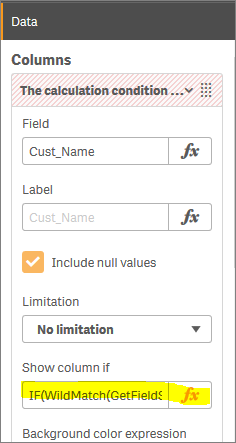
Use the "Show Column If" attribute and for example the condition NoOfRows([TOTAL])<10 000
Avoid calculated chart dimensions, but
Consider creating the field as a computed field in the table. For more details Go to CREATE TABLE.